Language
Currency
Check the results of the South Korean visa correctly? Without this process, you cannot clearly understand the status of your application. Many people eagerly await the results every day and worry about whether their visa has been approved or not. However, instead of that, you can quickly check online, nvktravel.com will guide you on how to proceed right below.
Checking the results of the South Korean visa can be done when the applicant has submitted their application and it has been approved. You are allowed to check the processing status to understand the situation through the website of the Embassy.
Some cases can perform the checking operation themselves, such as:
Through online checking on the system, you will clearly understand the review status as well as be able to reprint the visa, see the reason for the rejection,...
Cases where the results of the South Korean visa can be checked
To know whether your application is under review or not, you can proceed with the checking process right below. NKV Travel will share the most detailed way to help you operate smoothly.
>>> See more: All About South Korean Visa Application Procedures Fast
Currently, the place to obtain the results of the South Korean visa is the official website of the South Korean government. Additionally, you can visit the website of the Visa Application Center in each region such as Ha Noi or Ho Chi Minh City.
It is advisable to use smart devices like phones/computers to access the browser, making it easier to get results. The interface is designed in Korean, so it is recommended to use a computer for easier conversion to Vietnamese/English.
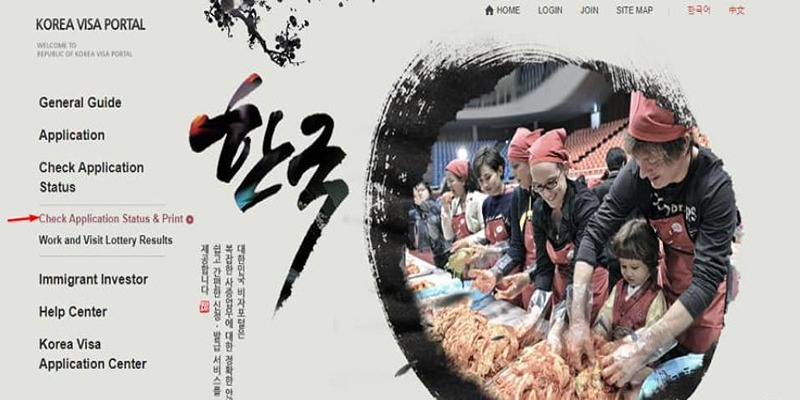
Access the official website of the South Korean government
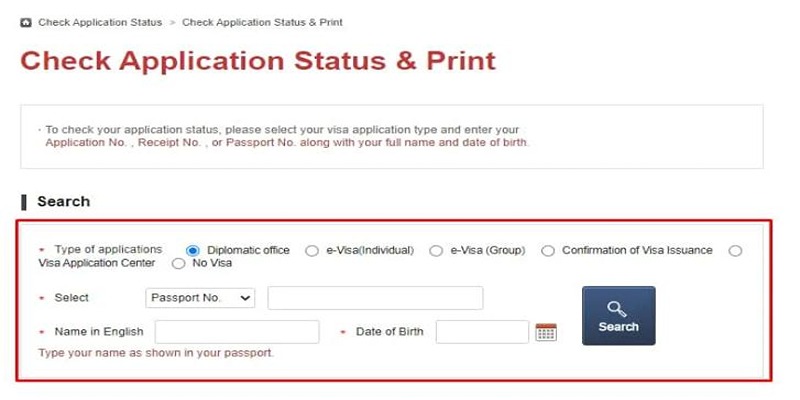
After switching to the appropriate language, immediately select the "Check Application Status" option. Then choose "Check Application Status and Print" and the system will immediately display a new interface for you to provide information in the form.
Continue by selecting "Check Application Status and Print"
Depending on the method of submitting the application, there will be two different cases.
Enter accurate data for successful checking
After clicking Search but no results appear and you see "No search data has been found," it means that the data entered is incorrect. At this point, to successfully check the results of the South Korean visa, please double-check carefully in step 3 to ensure no time is wasted.
Double-check the information carefully
Typically, according to regulations, the processing time will last about 3 - 5 days and the results will be returned no later than 2 working weeks. However, depending on each case and arising issues, it may change flexibly and take more days. Especially during the tourist season or the start of the school year in South Korea, or during holidays, the processing time will be longer.
In case you wait too long for the results but still have not received feedback, it is recommended to check periodically to keep yourself updated with the latest progress. This also helps you be more proactive in arranging your schedule.
>>> See more: What is a Japanese Commercial Visa?? Detailed Guide
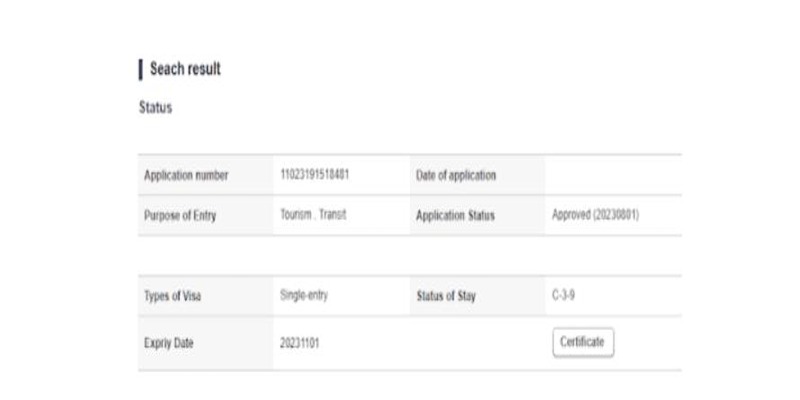
If you have received approval from the Embassy, checking the results of the South Korean visa will let you know the expiration date. The method is much simpler for searching information about whether the application is successful or not.
By observing your passport, you can easily see the expiration date of the visa. Depending on the type issued, for example, short-term tourism is valid for 30 days and the maximum stay is only 15 days. Checking the information will help you know the exact visa expiration date to plan your travel accordingly and avoid issues of overstaying.
Understanding the visa expiration date to avoid arising issues
To ensure a smooth and accurate checking process, you need to pay attention to some important contents as follows:
Note the information to ensure successful tracking.
Check the results of the Korean visa application has been detailed in the article. We hope the information above will help you proceed successfully; if you need to apply for a visa, please visit the website nvktravel.com for assistance.
Fill out the form and we will contact you